
Learning enough about AI to lead technical teams or evaluate vendors does not require coding expertise. The practical approach combines three skills: understanding what AI can and cannot do, testing ideas with no-code tools, and systematically comparing solutions against your actual business problem. This article walks non-technical founders through that sequence, using a coherent example and a reusable evaluation framework.
For founders in fintech, payments and prop trading, the useful question is not whether AI can automate a task, but whether the workflow can be measured and reviewed safely. The same principle guides vendor selection and team leadership: start with the operating constraint, then match the tool to the need.
Quick answer: Learning AI without a technical background
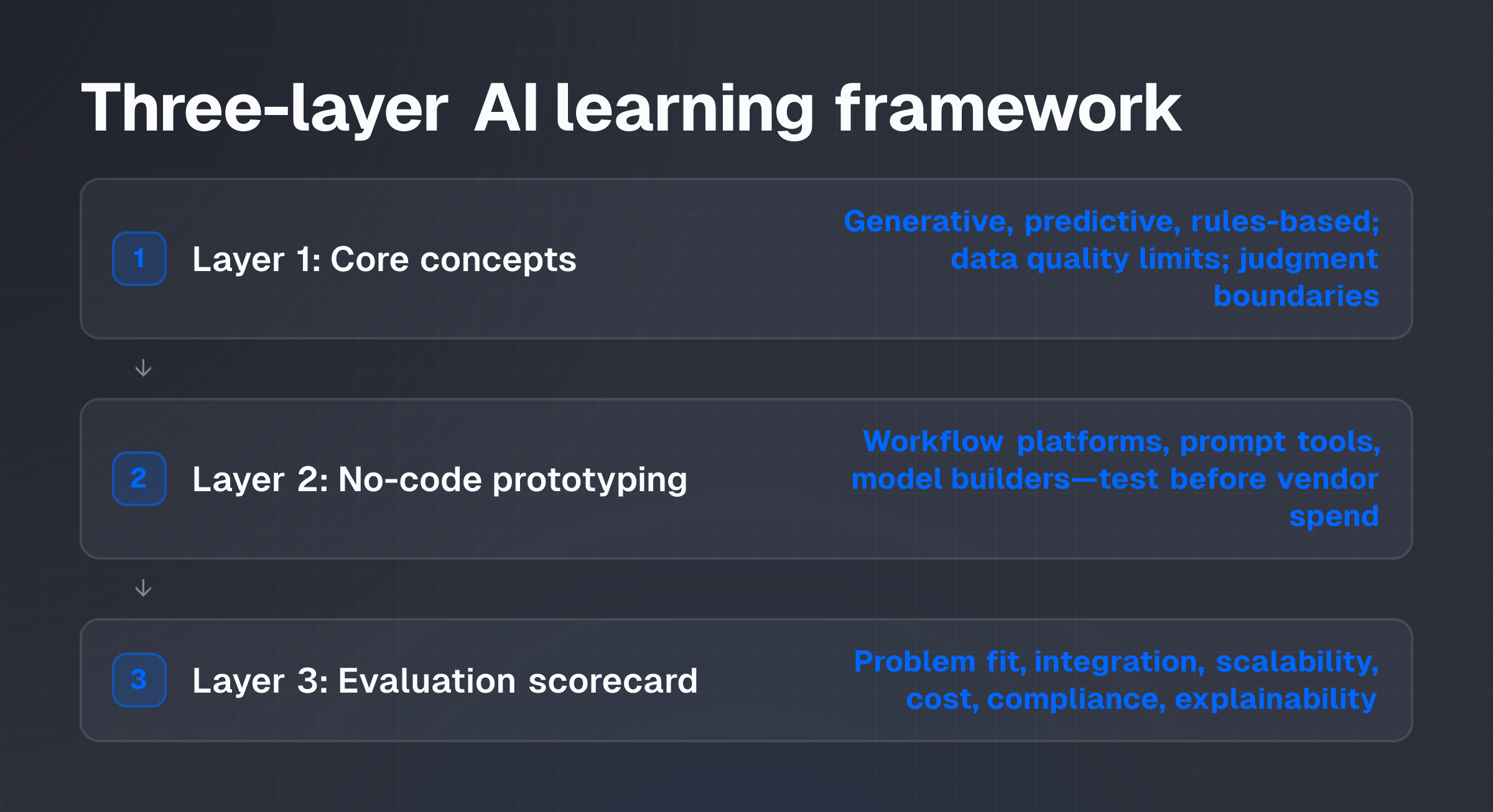
You don't need to become a developer. Build fluency in three layers:
Layer 1: Understand core AI concepts. Know the difference between generative AI (which creates new content), predictive models (which forecast outcomes based on historical patterns) and rules-based automation (which follows deterministic logic). Understand that AI models are only as good as the data they train on. Recognize what AI cannot do: it can't guarantee accuracy in novel scenarios, and it can't replace human judgment in high-stakes decisions.
Layer 2: Prototype with no-code tools. Experiment with workflow automation platforms that now include AI integrations, no-code model builders, and prompt-based tools that leverage large language models. This hands-on work builds intuition faster than reading alone and reveals practical constraints before you commit vendor budget.
Layer 3: Develop an evaluation scorecard. Assess potential solutions against your geography, risk exposure, team capacity and implementation constraints, not against feature lists. The right choice depends on problem-solution fit, integration ease, scalability, total cost of ownership (not just transaction price), data security and compliance, explainability, vendor support, and ethical considerations.
This combination, foundational literacy, prototype testing, and structured evaluation, equips you to lead technical discussions, ask informed questions during vendor pitches, and make decisions that actually improve your operating performance.
The workflow and operating decision
Before selecting technology, define the workflow and operating constraint.
Starting point: The operating problem
Consider a fintech or prop trading operations team processing customer onboarding documents: identity verification, proof of address, source of funds, and account activity rules. The workflow is high-volume, rule-based, and prone to manual error. Processing delays block account funding. Errors trigger regulatory review and rework.
The operating problem is clear: volume and consistency.
The constraint is regulatory compliance, any automation must be auditable and explainable. The desired outcome is faster onboarding with zero increase in compliance risk.
This context shapes technology choice. A "black box" AI solution that can't explain why it approved or rejected a document is unsuitable, regardless of accuracy. An audit trail and human review checkpoint are mandatory.
Defining the measurement baseline
Before automation, measure the current state:
- Volume: How many documents per day or week?
- Processing time: How long does one document take? How is time split between classification, verification, and decision?
- Quality: What percentage require rework or human escalation? Why?
- Compliance: Which decisions are logged and reviewed? Who owns the approval signature?
- Cost: What's the fully-loaded cost per document, including labor, review time, and rework?
For the onboarding example, measure these metrics before making any technology decision. If you discover that documents spend 60% of their time in manual classification and 20% in exception handling, automation design changes: you now prioritize the classification step, not end-to-end processing.
Retained human responsibilities
Identify which decisions can't be automated:
- Final approval authority (compliance, risk, or regulatory signoff).
- Exception handling (documents that don't fit the rule set).
- Appeals or disputes (customer challenges to a rejection).
- Periodic audit and model review (is the automation still working as intended?).
In onboarding, a human compliance officer must retain final approval. AI can flag high-risk documents for review, extract data, classify document type, and suggest a decision, but a person must sign off.
That retained responsibility shapes implementation: you're not replacing a team, you're reshaping it to focus on higher-judgment work and exception review.
Automation types and their limits
Distinguish between three distinct approaches:
Rules-based automation follows deterministic logic: "If document type = passport and date is valid, extract name and date of birth; if date is expired, flag for human review." It's repeatable, fully explainable, and reliable where rules are complete. It fails when new document types arrive or rules change, then logic must be rewritten. For onboarding, rules-based automation can classify document type and validate basic data fields, but can't assess whether a submitted proof of address is genuinely the customer's current residence.
Predictive models learn from historical data to forecast outcomes. For onboarding, a model trained on past onboarding decisions could flag whether a new application presents higher compliance risk based on patterns in the training data. The model's strength is handling new scenarios within the learned pattern space; its weakness is that it depends entirely on training data quality and can perpetuate biases present in historical decisions. If past approvals were systematically biased toward certain geographies or demographics, the model will replicate that bias.
Generative AI creates new content or performs complex analysis on unstructured data. For onboarding, a large language model can read a proof of address document in many formats, extract relevant fields, and summarize the content, work that rules-based systems struggle with because document formats vary. The trade-off is that generative systems are less transparent: explaining exactly why the model selected one piece of data over another is harder than explaining a rule.
None of these is universally better. Effective automation stacks all three:
- Use rules for straightforward, high-volume decisions (document type, basic field validation).
- Use predictive models for risk flagging where historical patterns exist and data quality is high.
- Use generative AI for unstructured data extraction and document summarization.
- Keep human review and final approval for all material compliance decisions.
Common mistakes and trade-offs
Over-reliance on black-box solutions. Implementing a generative AI system without understanding its data sources, training approach or failure modes creates compliance and audit risk. In regulated industries, the ability to explain a decision isn't optional. If a model rejects an application and can't articulate why, regulators will demand that you rebuild the system with explainability built in.
Ignoring data quality. AI models are only as good as the data they train on.
If your historical onboarding data is incomplete, biased, or mislabeled, any model trained on it will inherit those problems. Poor data in means poor performance out. Before deploying a predictive model, audit the training dataset: check for missing fields, outliers, and imbalance across categories.
Scope creep. Beginning with a goal to automate entire onboarding, then discovering halfway through that you need to integrate with three external systems, retrain a model on live data, and rebuild your approval workflow. Start small: automate document classification first, measure the result, then expand to data extraction. One success builds credibility and captures learnings that make the next phase faster.
Underestimating change management. Automation changes job roles and decision authority. If your operations team has always made the final approval decision, shifting that authority to an AI system (or to a compliance officer reviewing AI-flagged cases) requires communication, training, and often some staff redeployment. Failing to plan for this causes teams to reject the automation, even if it technically works.
Security and privacy risks. Onboarding documents contain sensitive personal data. Sending that data to a third-party AI vendor without clear data processing agreements and encryption creates liability. Know where your data is stored, who can access it, and what happens after processing is complete. For regulated fintech, this isn't optional.
A worked example: Document classification in onboarding
Current state:
- Volume: 300 documents per day, 6 days per week.
- Processing time: 2 minutes per document to classify and extract basic fields (600 minutes = 10 hours per day).
- Current staffing: 2 FTE operations staff at $50,000 per year each.
- Error rate: 8% of documents require rework after initial classification, costing 1 additional hour rework per week (cumulative).
- Compliance review: Every 50th document is audited by a compliance officer (1 hour per week, overlaid on existing role).
Operating cost (baseline):
- Direct labor: 2 FTE × $50,000 = $100,000 per year.
- Rework labor: 1 hour per week × 52 weeks × $25/hour = $1,300 per year.
- Compliance review (absorbed into existing role): $0 incremental cost.
- Total annual cost: $101,300.
- Cost per document: $101,300 ÷ (300 × 252 working days) = $1.34 per document.
Automation scenario:
Option A: Rules-based automation for document classification and basic field extraction.
- Implementation cost: $12,000 (vendor setup, rule configuration, integration with onboarding system).
- Annual maintenance: $3,000 (rule updates, vendor support).
- Processing reduction: Automation handles classification and basic extraction; human time drops from 2 minutes to 0.5 minutes per document (review and exception handling only).
- New staffing requirement: 0.5 FTE (1 person, 25 hours per week).
- New annual labor cost: 0.5 × $50,000 = $25,000.
- Rework rate improvement: Automation errors are caught during rule configuration; rework drops to 2% of documents = $325 per year.
- Compliance review: Remains overlaid.
Costs and benefit (Scenario A):
- Year 1: Implementation $12,000 + labor $25,000 + maintenance $3,000 + rework $325 = $40,325 total.
- Year 2 onwards: Labor $25,000 + maintenance $3,000 + rework $325 = $28,325 per year.
- Payback period: ($40,325 − $28,325 annual saving) ÷ ($101,300 baseline) = Year 1 cost of $40,325 paid back by annual saving of $28,325 − $3,000 = $25,325, so payback ≈ 1.6 years.
- Annual capacity released: 1.5 FTE hours freed up for higher-judgment work (exception handling, process improvement, compliance review support).
- Net annual saving (Year 2): $101,300 − $28,325 = $72,975 per year in labor cost and rework; equivalent to 1.5 FTE redirected.
Cost per document (Scenario A): $28,325 ÷ (300 × 252 working days) = $0.37 per document (after payback).
Alternative: Generative AI for unstructured document extraction.
Option B: Deploy a large language model to handle multiple document formats (passports, utility bills, bank statements) in a single system.
- Implementation cost: $25,000 (data setup, model selection, integration, testing).
- Annual subscription (vendor API access): $8,000 (metered on document volume; $0.02 per document × 90,000 annual documents).
- Processing time: 0.3 minutes per document (faster because one system handles all formats).
- New staffing requirement: 0.3 FTE (review and exception handling).
- New annual labor cost: 0.3 × $50,000 = $15,000.
- Rework rate: Generative systems handle format variation better; rework drops to 1.5% = $244 per year.
- Compliance consideration: Requires audit trail and explainability review; add 2 hours per week of compliance officer time = $2,600 per year (vendor-provided explainability logs reduce this vs. black-box models).
Costs and benefit (Scenario B):
- Year 1: Implementation $25,000 + labor $15,000 + subscription $8,000 + maintenance $3,000 + rework $244 + compliance review $2,600 = $53,844 total.
- Year 2 onwards: Labor $15,000 + subscription $8,000 + maintenance $3,000 + rework $244 + compliance review $2,600 = $28,844 per year.
- Payback period: Year 1 cost $53,844 vs. annual saving of $101,300 − $28,844 = $72,456. Payback ≈ 0.74 years (9 months).
- Annual capacity released: 1.7 FTE hours freed up.
- Net annual saving (Year 2): $101,300 − $28,844 = $72,456 per year.
Cost per document (Scenario B): $28,844 ÷ 90,000 = $0.32 per document (after payback).
Comparison:
| Metric | Baseline | Option A (Rules) | Option B (Generative) |
|---|---|---|---|
| Year 1 cost | $101,300 | $40,325 | $53,844 |
| Annual cost (Year 2+) | $101,300 | $28,325 | $28,844 |
| Cost per document (Year 2+) | $1.34 | $0.37 | $0.32 |
| Payback period | - | 1.6 years | 0.74 years |
| Capacity released | - | 1.5 FTE | 1.7 FTE |
| Explainability | Implicit (human review) | Full (rule-based) | Partial (audit logs, not fully transparent) |
Key observation: Option B (generative AI) offers faster payback and greater capacity release, but introduces explainability trade-offs for a regulated workflow. Option A (rules-based) is more transparent and may be preferred if regulatory stance is strict.
The right choice depends on your compliance requirements, not just cost.
Retained costs:
- Neither option eliminates human review: 0.3-0.5 FTE remains, focused on exceptions and compliance sign-off.
- Compliance officer time is retained or increases slightly (Option B adds $2,600 per year for explainability review).
- Neither scenario reduces staffing to zero; both redirect staff from routine classification to higher-judgment work.
Setting acceptance criteria before pilot
Define what success looks like before you deploy:
- Accuracy: What percentage of classifications must be correct to consider the automation reliable? Set a threshold tied to your compliance tolerance. If documents are classified incorrectly, what's the downstream cost? If that cost is high (regulatory review, delayed funding), require 99%+ accuracy. If lower, 95% may suffice.
- Processing speed: How much faster must automation be to justify the change? If your goal is to free up 1.5 FTE, the system must process enough volume to reach that target. Use the baseline you measured.
- Exception rate: How many documents will require human review or rework? For a rules-based system, set a target exception rate (e.g., "no more than 5% escalation"). For a generative system, test on a sample of recent documents before go-live and measure actual error rate.
- Audit trail: Every decision must be logged: timestamp, document ID, decision, reasoning (for generative systems, the prompt and model output). This is non-negotiable for compliance.
- False positive/negative cost: In onboarding, a false negative (incorrectly approving a high-risk applicant) is worse than a false positive (incorrectly flagging a legitimate applicant). Weight your acceptance criteria accordingly. If false negatives are 10x more costly, you may tolerate 95% sensitivity but require 99.5% specificity.
Failure modes and recovery
Anticipate what can go wrong:
Model drift. Generative or predictive models perform well on training data but deteriorate as new patterns emerge in production data. For onboarding, new document formats arrive, or fraudsters submit forged documents the model hasn't seen.
Recovery: Schedule monthly reviews of model performance against the original acceptance criteria. If accuracy drops below threshold, halt automation and trigger manual review until root cause is found.
Integration failures. The automation system can't communicate with your onboarding platform, or data format changes break the integration. Recovery: Maintain a manual fallback (staff revert to human review). Design integration with redundancy and monitoring alerts.
Data quality degradation. If historical data used to train a predictive model becomes outdated (e.g., regulatory rules change), the model's decisions no longer reflect current policy. Recovery: Retrain on updated data, or switch to rules-based automation if data quality can't be assured.
Compliance audit findings. An auditor reviews the automation system and identifies a gap: decisions aren't sufficiently explainable, or the audit trail is incomplete. Recovery: Document the system design and decision logic. For generative AI, provide audit logs showing prompts, outputs, and human review decisions. For rules-based systems, provide the rule set and change log.
Staffing resistance. Operations team members feel threatened by automation and slow-walk the transition, finding workarounds to bypass the system.
Recovery: Involve staff early in design. Show how automation frees them to focus on exceptions and process improvement, not how it eliminates their role.
Human review checkpoint
Retain a human approval step, especially in regulated workflows:
- High-risk documents: Any document flagged by the system as potentially risky or any exception escalates to human review before final approval.
- Sample review: Even documents the system approves with high confidence should be sampled (e.g., 1 in 100) and reviewed by a human to validate that the system is working as expected.
- Authority: Define who has approval authority. In onboarding, this is typically a compliance officer or operations manager, not the system.
- SLA: Set a target time for human review. If review takes longer than your target SLA, the automation becomes a bottleneck. This reveals that your staffing or process needs redesign.
Pilot scope
Before full rollout, run a pilot on a subset of your workflow:
Size: Process 2-4 weeks of real production documents (600-1,200 documents for a 300/day volume). Large enough to encounter real variance, small enough to manage if issues arise.
Timing: Run the pilot in parallel with your current process, not instead of it. Continue processing documents the old way while the automation processes a copy. Compare results and measure accuracy without blocking live customers.
Outcome measurement:
- Accuracy: Compare automation classifications to the human decisions made in parallel.
- Processing time: Measure actual time reduction.
- Exception rate: Count how many documents require human review or rework.
- Audit trail: Confirm that all decisions are logged and explainable.
- Compliance: Have your compliance officer review a sample of automation decisions against your policies.
Go/no-go decision
After the pilot, decide whether to proceed:
Go conditions:
- Accuracy meets or exceeds your acceptance threshold (e.g., 98%+).
- Processing time reduction delivers the expected capacity release (e.g., 1.5 FTE freed).
- Exception rate is within tolerance (e.g., <5% require human escalation).
- Audit trail is complete and accessible.
- Compliance officer approves the system design and control framework.
- Team feedback is positive or neutral (no signs of active resistance).
No-go conditions:
- Accuracy falls significantly short (e.g., <90%).
- Exception rate exceeds expectations, defeating the capacity benefit.
- Audit trail is incomplete or non-compliant.
- Integration with your platform is unstable or requires constant manual workarounds.
- Compliance officer raises material concerns about explainability or risk.
Staged rollout
If pilot succeeds, roll out in phases:
- Week 1-2: Process 50% of daily volume; keep 50% on manual path as fallback.
- Week 3-4: Process 75% of daily volume; monitor for issues and adjust rules or model as needed.
- Week 5+: Full rollout, with continued daily monitoring and weekly performance reviews.
This staged approach catches integration issues and performance problems while your team can still react quickly.
Conclusion and next step
Non-technical founders can lead AI automation decisions by following a simple sequence: (1) measure your current workflow and define the problem you're solving, (2) learn enough about AI types and their limits to ask informed questions, (3) prototype with no-code tools to test ideas safely, and (4) evaluate solutions against a scorecard tied to your compliance, cost and capacity constraints, not against feature lists.
The worked example shows that two technically different approaches (rules-based vs. generative AI) can produce similar operating value but differ in explainability, payback speed, and risk profile. Neither eliminates human judgment; both free staff to focus on higher-value work.
The right choice depends on your specific operating constraints and risk tolerance.
Next action: Conduct a workflow audit of one process in your company where high volume, repetition, or error rate creates cost or compliance burden. Map the process, measure the current baseline (processing time, error rate, cost per unit), and identify where human decision-making happens. Document where human judgment is irreplaceable and where rule-based or predictive logic could assist. This becomes your starting point for a pilot.
Don't start with a technology search or vendor list. Start with your operating problem and your measurement baseline. The technology follows the problem, not the reverse.