
As a non-technical founder, you don't need to become an AI engineer to lead technical teams or evaluate vendor solutions. Your goal is to understand what different AI technologies can and cannot do in your business, build hands-on intuition through low-risk prototyping, and develop a systematic scorecard for comparing options against your actual operating constraints. The roadmap below walks through three sequential steps: mastering core concepts so you can articulate capabilities and limitations; experimenting with no-code tools to validate workflows before investment; and applying evaluation criteria that separate problem-solution fit from vendor marketing.
Quick answer: Building AI literacy without code
A non-technical founder gains operational competence in AI by distinguishing between artificial intelligence (the broad field), machine learning (systems that learn from data), and large language models (AI trained on text to generate or understand language). The distinction matters because each type solves different problems and carries different constraints. Understanding what each does in business terms, not how it works internally, lets you ask vendors the right questions, spot when scope creeps beyond what a tool can deliver, and avoid cost traps. Start by clarifying which repetitive, measurable tasks in your workflow could benefit from automation, then test solutions on a small scale using no-code platforms before committing budget to implementation.
The workflow and operating decision
The operator's problem is one of knowledge asymmetry.
A non-technical founder hiring engineers or evaluating third-party AI tools often lacks vocabulary to assess whether a proposed solution actually solves the stated problem, or whether it's overengineered, under-resourced, or misaligned with the firm's data and operating environment. Poor vendor choices delay go-live, inflate costs, and can leave you dependent on the vendor to explain what went wrong.
The workflow involves three sequential decisions. First, identify a specific, repetitive operational task that consumes time and has measurable inputs and outputs. Examples include data entry, customer inquiry response, document categorization, or trade reconciliation. Avoid starting with open-ended "automate my entire operations" mandates. Second, map the task's constraints: How much data arrives per day or week? Who currently owns quality control? What happens if the output is 90% accurate versus 100% accurate? Which mistakes cost most? Is speed the bottleneck or accuracy? These constraints shape which technology is appropriate. Third, select a decision framework to compare vendors and solutions on criteria that match your constraints, not generic marketing claims.
The reader is a founder or operations leader in fintech, payments, brokerage or prop trading who has the authority to commit budget and set implementation priorities but may have limited hands-on coding experience. You need to move past "AI can do anything" into "AI can solve this specific problem under these constraints for this cost."
Approaches and trade-offs
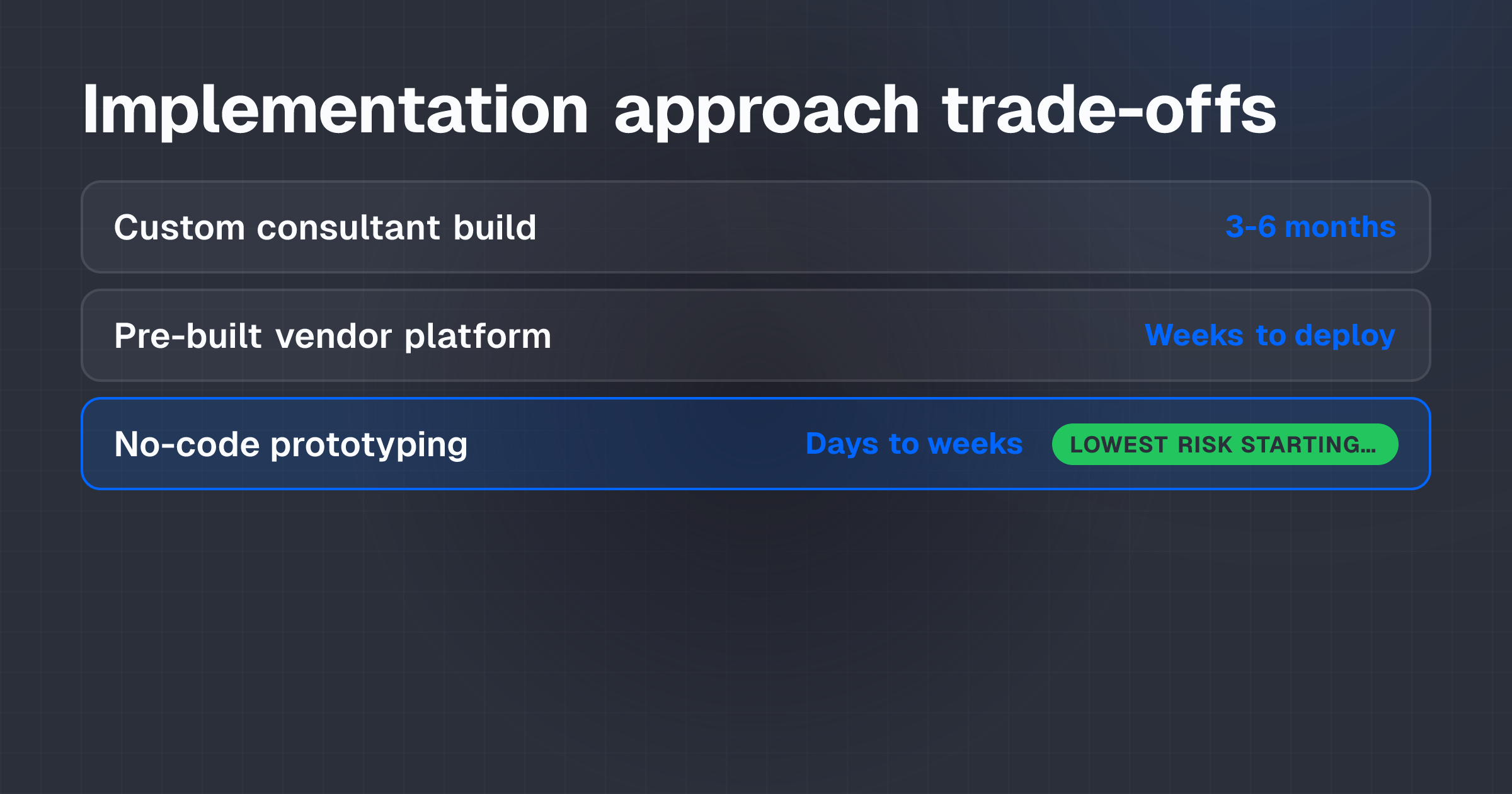
Non-technical founders typically face three broad approaches: hire a data science consultant to build a custom solution, buy a pre-built vendor platform, or prototype internally using no-code tools before deciding on vendor fit.
Building custom AI solutions with a consultant or hire
Custom development can be tailored precisely to your workflow, data, and compliance requirements. The team remains under your control.
But custom builds are slow, typically 3-6 months for a production model, and expensive (consultant rates and staff costs). Someone on your team must own the ongoing management. If the consultant leaves, you inherit technical debt. Custom models often fail because the underlying data quality is poor, or because the problem was mis-specified at the outset.
Best for: High-stakes workflows where regulatory compliance, proprietary data handling, or unusual business logic justifies the investment. Example: A prop firm building a proprietary position-sizing model based on real-time trader behavior.
Buying a pre-built platform (vendor AI solution)
Pre-built platforms are faster to deploy, come with support contracts, and distribute the cost across many customers. Vendors typically handle model maintenance and updates.
The constraint? Pre-built solutions are generic. They assume data in a standard format, workflows that fit the vendor's design, and acceptable accuracy targets set by the vendor. Integration with legacy systems can be complex and expensive. You have limited visibility into why the model makes specific decisions, and you can't modify the underlying logic if it underperforms in your context.
Best for: Standard, high-volume tasks where accuracy trade-offs are acceptable. Example: Automated customer service chatbots, routine data classification, or compliance alert triggering.
Prototyping with no-code AI tools
No-code platforms let you build and test workflows in days or weeks without writing code or hiring engineers. You gain hands-on experience with data inputs, model outputs, and integration pain points. The cost is low enough to treat prototyping as a learning investment, not a sunk cost.
No-code tools have boundaries. They typically handle well-defined, repetitive tasks with clear input-output mappings. They may not scale to millions of transactions, and they often lack the explainability and audit trails required for regulated workflows. They're a learning tool, not always a final production solution.
Best for: Non-technical founders proving concept fit before committing to a vendor or custom build. Building intuition about data quality, model accuracy, and integration requirements. Testing whether a workflow is automatable at all before investing engineering time.
Common trade-offs and mistakes
Over-reliance on vendors creates risk. Not learning enough about AI concepts can leave you defenseless when a vendor's proposal seems plausible but is actually misaligned with your constraints. You end up negotiating from a position of weakness.
Ignoring data quality is a trap. AI models are only as good as the data they train on. Poor data, incomplete records, inconsistent formats, missing edge cases, leads to models that fail in production. Many founder teams discover this too late.
Scope creep kills projects. Starting with "automate everything" instead of one specific, measurable task often results in project failure. The more variables in a workflow, the longer development takes and the more opportunities for misalignment.
Integration complexity gets underestimated. Even simple AI solutions often require significant effort to connect with existing systems, data pipelines, and approval workflows. Plan for this cost separately from the AI license or build.
Ethical and regulatory considerations aren't optional. AI models can embed bias from training data, leading to unfair or inaccurate outcomes. In regulated industries, bias, explainability, and data privacy are mandatory. Failing to audit for these issues creates compliance risk and reputational damage.
Not every problem needs AI. Some workflows improve through process redesign, better tooling, or rule-based logic that doesn't require machine learning at all. Distinguish between tasks where AI adds genuine value and tasks where a simpler fix works.
Costs, capacity and expected value
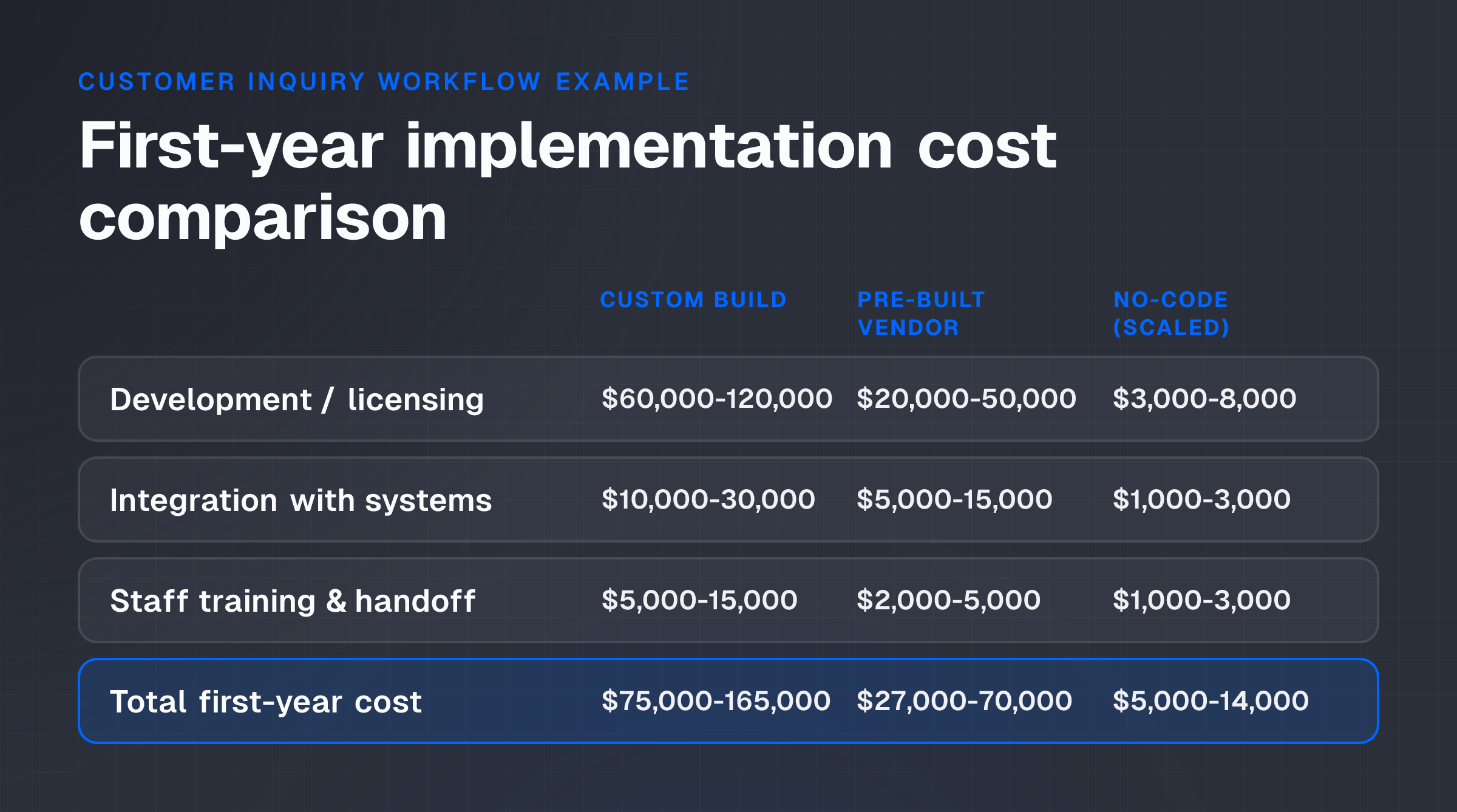
Cost models for non-technical founder evaluation require clarity on three components: the cost of learning and prototyping, the cost of implementation (whether custom, vendor, or no-code), and the realized operating benefit.
Illustrative cost model: Prototyping a customer inquiry response workflow
Consider this scenario. A fintech operator receives 200 customer inquiries per day via email, support tickets, and social media. Current process: A support team of two full-time staff manually read each inquiry, categorize it (account issue, product question, complaint), and route it to the correct department. Average time per inquiry: 3 minutes. Current labor cost: $8 per inquiry ($480 per day, roughly $120K per year for this task alone).
Prototyping phase (no-code platform):
- Time to build a prototype workflow: 1-2 weeks
- Cost: Platform subscription (around $100-300 per month), plus 20 hours of your team's time learning and testing
- Output: A working model that classifies inquiries and routes them, running on historical and live data
- Success metric: Does the model categorize 90%+ of inquiries correctly?
Go/no-go decision point: If the prototype achieves 85%+ accuracy and integrates with your ticketing system, the workflow justifies further investment. If accuracy is below 75%, or if integration proves too complex, you know before committing to a vendor contract or custom build.
Implementation phase (assuming go decision):
| Cost component | Custom build | Pre-built vendor | No-code (scaled) |
|---|---|---|---|
| Development / licensing (first year) | $60,000-120,000 | $20,000-50,000 | $3,000-8,000 |
| Integration with existing systems | $10,000-30,000 | $5,000-15,000 | $1,000-3,000 |
| Staff time for training & handoff | $5,000-15,000 | $2,000-5,000 | $1,000-3,000 |
| Total first-year cost | $75,000-165,000 | $27,000-70,000 | $5,000-14,000 |
Realized operating benefit:
If the deployed model classifies 90% of inquiries correctly, and support staff manually review the remaining 10%, the model removes roughly 3 minutes from 90% of 200 daily inquiries. That's 270 minutes saved per day, or 4.5 FTE hours per day, translating to about $240 per day, around $60K per year in labor capacity released.
If the model runs for 3 years before retraining, and licensing cost is $5K/year on a no-code platform, the 3-year ROI is $180K in realized labor capacity minus $15K in licensing, for a net $165K in capacity released over 3 years. This is released labor capacity, not a direct cash saving, unless the firm reduces headcount.
Key uncertainty: Accuracy in production often drifts from prototype performance if new inquiry types arrive or customer communication patterns shift. Budget for quarterly model review and retraining.
Capacity vs. cost distinction
"Realized capacity" isn't the same as "cash saved." If the model releases 4.5 FTE hours per day, the firm can either (1) redeploy those staff to higher-value work, (2) reduce headcount at the next hiring cycle, or (3) absorb the freed capacity with no change. Only options (1) and (2) convert to measurable business benefit. The cost model should isolate which applies to your situation.
Controls and failure conditions
AI systems in operations require governance because failures are often silent: a model degrades gradually, accuracy drifts, or edge cases fail in ways that are hard to detect without active monitoring.
Establish baseline accuracy and service-level acceptance
Before deploying, define three things.
First, baseline: Current human performance on the task. Example: Support staff achieve 95% accuracy in categorizing inquiries; 2% are miscategorized, 3% are escalated due to ambiguity.
Second, acceptable performance threshold: Will you accept 90% accuracy to save cost, or does the workflow require 98%? This depends on consequence, miscategorized customer complaint might escalate to social media; miscategorized product question might delay trading setup.
Third, review cadence: How often will you audit the model's performance? Weekly, monthly, quarterly?
Distinguish between types of AI and required controls
Generative assistance (e.g., LLM-powered support response draft): The model suggests an output, but a human reviews and approves before sending. Controls focus on the quality and appropriateness of the suggestion; humans retain decision authority. Failure is typically delay, not wrongness.
Predictive models (e.g., fraud flagging in a transaction): The model scores risk and flags suspicious transactions for human review. Controls monitor false-positive and false-negative rates. Failure occurs when high-risk transactions slip through or legitimate transactions are blocked unnecessarily.
Rules-based automation (e.g., auto-route support tickets by category): The system applies a set of deterministic rules (if category = "account issue," route to Account Team). Controls validate that categorization is correct and rules are up to date. Failure occurs when rules become stale or categories shift.
Each type requires different oversight. Generative assistance is usually lower-risk because humans remain in the loop. Rules-based automation is deterministic but can fail if rules aren't reviewed as the business evolves. Predictive models require ongoing accuracy monitoring because degradation can be invisible.
Implement monitoring and escalation
Data quality checks come first. Before the model processes new inputs, verify that data is in expected format, ranges, and completeness. If data quality drops, pause the model and alert the operations team.
Accuracy audits follow. Monthly or quarterly, sample the model's outputs and have a human audit them against ground truth. If accuracy falls below the threshold, investigate and retrain.
User escalation reporting matters. Track how often humans override the model or escalate decisions. A rising escalation rate suggests the model is failing or encountering new types of cases it wasn't trained on.
Cost and latency tracking closes the loop. Monitor whether the model is actually delivering the promised cost savings and speed improvements. If not, investigate setup, data input, or output handling.
Failure conditions that require intervention
Several conditions demand immediate action:
- Model accuracy falls below 85% for two consecutive review periods
- Integration errors cause more than 5% of automated outputs to fail to reach their intended destination
- Data quality issues cause the model to receive incomplete or malformed inputs more than 10% of the time
- Escalation rate rises above 15% (suggesting the model is handling fewer of the workflow's edge cases than expected)
- Compliance or security audit flags the model's decisions as unexplainable or biased
Pilot and decision criteria
A well-designed pilot proves that a workflow is automatable, measures actual performance under production conditions, and builds team confidence before full rollout.
Pilot scope and timeline
Run the model on a subset of live data, not the entire workflow. Example: Process 50 customer inquiries per day through the model for 4 weeks, while the existing team handles the remaining 150 manually. This limits downside if the model fails.
Duration matters. Four to eight weeks is typical. This is long enough to encounter seasonal variation, day-of-week patterns, and edge cases that a prototype might miss.
Success criteria (defined before launch):
- Model accuracy ≥ 90% on the pilot cohort
- Integration errors ≤ 2% of outputs
- Time saved per inquiry ≥ 2 minutes (the target was 3 minutes; 2 minutes represents a conservative win)
- User satisfaction (support staff using the model) ≥ 7 out of 10
- No compliance or data security issues detected
Go/no-go decision
At the end of the pilot, measure actual performance against the criteria above. Document the results.
Metric achieved: Model achieved 92% accuracy on 2,000 pilot inquiries, exceeding the 90% threshold. Integration errors occurred in 1.8% of outputs (below the 2% threshold). Average time per inquiry fell from 3.0 to 1.2 minutes, saving 1.8 minutes per inquiry.
Failure or shortfall: If accuracy is 82% or integration errors exceed 3%, the pilot signals that either the model needs retraining, the integration approach needs redesign, or the workflow isn't automatable at the stated threshold. Before scaling, investigate the root cause and decide whether to iterate or halt.
Conditional go: If accuracy is 88% but the model performs well on high-volume inquiry types (70% of traffic) and weaker on rare types (5% of traffic), a conditional deployment is possible: deploy the model for routine inquiries, keep the manual process for edge cases. This hybrid approach reduces labor cost while preserving quality.
Scaling decision
Once the pilot succeeds, plan full rollout. Expand cohort size gradually, 50 to 100 to 200 inquiries per day over 2-4 weeks. Monitor accuracy and error rates during each expansion phase. Document the model's performance thresholds and escalation rules for the operations team. Assign ownership: who is responsible for monitoring, retraining, and updating the model when performance drifts?
Conclusion and next step
As a non-technical founder, your competitive advantage isn't in coding AI systems, it's in asking the right questions and translating business constraints into measurable success criteria.
The roadmap is straightforward. Invest 2-3 weeks building competence in AI concepts and their business applications. Prototype one specific, repetitive workflow using a no-code platform to validate whether automation is worth pursuing. Use the pilot results to make a go/no-go decision on a full vendor or custom build. Establish governance and monitoring to ensure the deployed model delivers sustained value.
Next action: Identify one high-volume, repetitive operational task in your business where accuracy can be measured and where 10-20% time savings would materially improve margins or speed. Define the current baseline (time per task, error rate, cost), then spend 1-2 weeks experimenting with a no-code AI platform on a small sample of that workflow. Use the prototype to validate the three critical questions: Is the workflow measurable? Can the model achieve acceptable accuracy? Can it integrate with your existing systems? If yes to all three, proceed to a vendor evaluation or custom build. If no, revisit the workflow design or move to a different operational area.