
AI tools promise efficiency gains in pilot phases, but fintech operators often stop using them within months of wider rollout. The discontinuation stems from three core problems: teams lack training to operate the tools effectively, the tools create friction rather than fit into existing workflows, and the actual return on investment diverges sharply from initial projections. Understanding why adoption fails, and what makes certain implementations stick, is essential before committing budget and headcount to an AI copilot, automation dashboard, or governance platform.
Quick answer: Why pilots succeed but adoption fails
A successful pilot doesn't predict sustained use. Fintech teams typically encounter one or more of three adoption barriers: training deficiencies that leave users unable to extract value; workflow friction where the AI tool slows rather than accelerates work; and ROI disappointment when measured benefits fall short of what was promised during evaluation. The tools that actually stick are those designed to integrate into existing workflows, bundled with realistic expectations, ongoing support, and continuous iteration based on user feedback.
The workflow and operating decision
Before selecting an AI tool, define the operating problem it's intended to solve. Start with the existing workflow: What decision or task does the team perform today? How many people perform it? How long does it take?
What constraints, data quality, regulatory review, exception handling, define success?
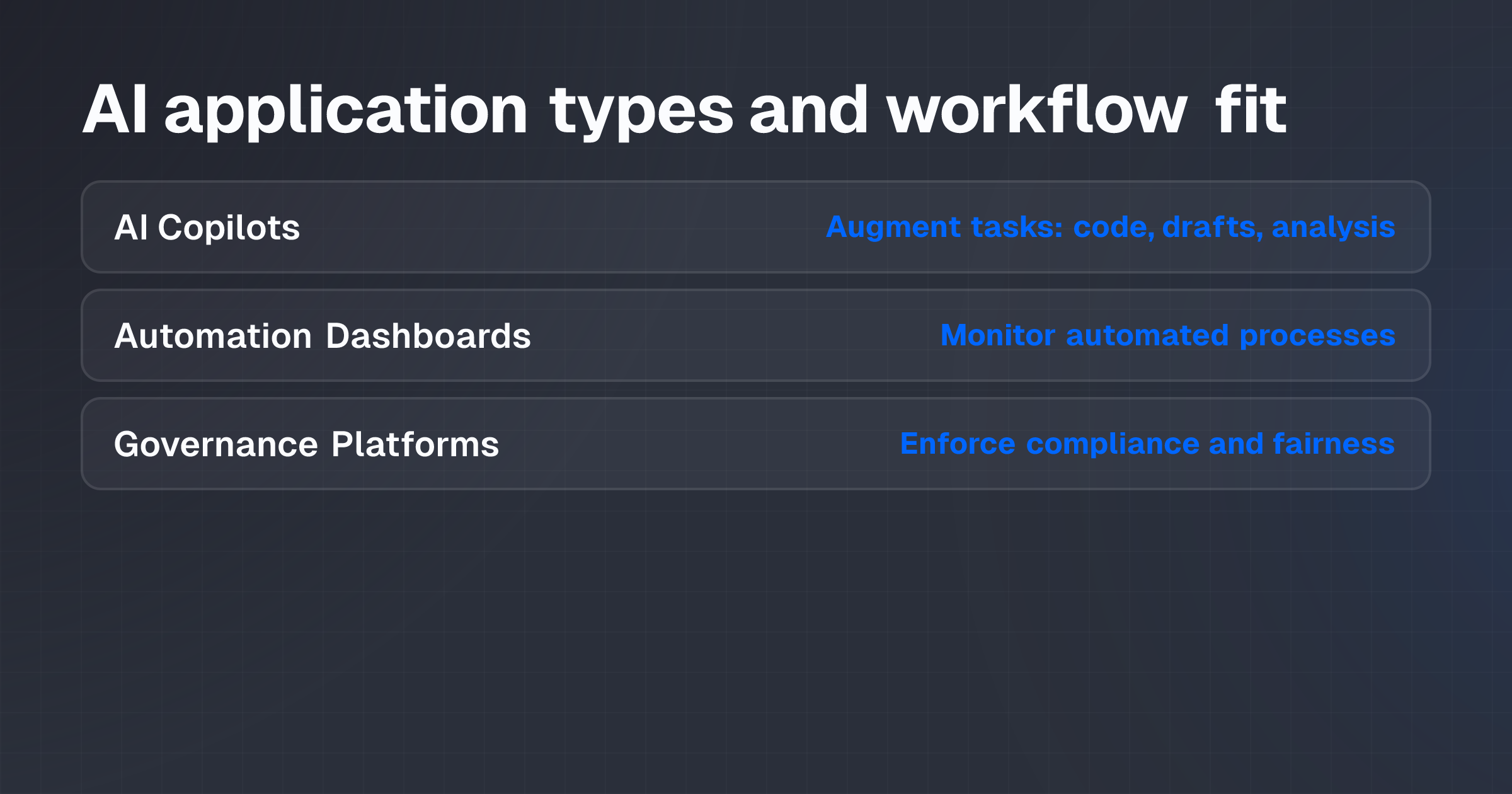
Consider three common applications in fintech:
AI Copilots augment human tasks such as code generation, communications drafting, or data analysis. A compliance team might use a copilot to draft regulatory correspondence; a developer team might use one to accelerate code review.
AI Automation Dashboards provide centralized oversight and control of automated processes. A payments operations team might use a dashboard to monitor transaction reconciliation, flag anomalies, and manually override decisions when needed.
AI Governance Platforms enforce compliance, security, and fairness standards across AI deployments. A fintech firm handling sensitive customer data needs governance tools to manage access, audit decisions, and document compliance with regulations such as fair lending requirements.
Each serves a distinct role.
Conflating them, or assuming a single tool solves multiple problems, is a common first mistake.
An operator's decision hinges on four prior questions:
- Is the workflow measurable? Can you define success objectively: fewer errors, shorter cycle time, lower cost, higher consistency? Unmeasurable workflows are candidates for human judgment, not automation.
- Can it be reviewed? Must a human verify or correct the output? Governance platforms and oversight mechanisms become mandatory if the answer is yes.
- What happens when it fails? What's the cost of an incorrect decision, missed deadline, or system outage? High-consequence workflows require robust fallback procedures and tight integration with existing systems.
- Is the team trained and ready? Training deficiency is cited as a primary cause of post-pilot abandonment. Before pilot start, assess the team's baseline skill level, learning capacity, and available time for training.
If you're working through this decision for a business you operate, apply for a structured review process to stress-test assumptions about workflow fit, implementation cost, and measurable outcome.
Approaches and trade-offs
Three distinct mechanics apply to different use cases:
Generative assistance (copilots) produces new content, code, drafts, analysis, that a human reviews and edits before use. A trader using an AI journal tool to analyze session psychology receives AI-generated insights; the trader retains final decision authority. The retained human workload includes review, correction, and override when the AI output is inaccurate or inapplicable.
Predictive models forecast outcomes or detect patterns. A transaction monitoring system might predict the probability that a deposit is money laundering; a human compliance officer reviews the flagged transaction and decides whether to escalate. The model reduces false negatives at the cost of false positives that humans must triage.
Rules-based automation executes predetermined decisions without human intervention per transaction. A payment reconciliation system can automatically match and settle 95% of daily transactions if the rules are stable and the data quality is high; the remaining 5% require manual review and correction.
Governance becomes critical: if the rules drift or data quality degrades, the system produces errors at scale.
Each carries different trade-offs:
- Automation vs. Control: Wider automation increases efficiency but reduces direct oversight. A fully automated settlement process is faster but more opaque; a dashboard-monitored process slows decision time but surfaces anomalies.
- Speed vs. Accuracy: Rapid deployment can deliver quick wins but may compromise validation and integration. Rushing an AI tool into production without testing its interaction with existing systems often creates downstream workflow friction.
- Consistency vs. Context: Rules-based systems are consistent but inflexible; they struggle with exceptions and edge cases that require human judgment. Copilots are flexible but inconsistent; the same prompt may yield different outputs.
Common mistakes that lead to post-pilot abandonment:
- Underestimating training burden. Teams assume intuitive adoption without structured, ongoing training on the tool's capabilities, limitations, and correct use cases. New tools require 2-4 weeks of active practice before team members reach baseline competency.
- Ignoring workflow friction. Pilots often run in controlled conditions (small user group, isolated data, researcher support). Wider rollout exposes friction: the tool requires manual data cleanup before use, outputs require extensive human editing, or the tool slows down existing systems integration. When friction outweighs benefit, users abandon it.
- Setting unrealistic ROI expectations. Pilots may project 30% time savings; actual rollout achieves 8-10% because of review overhead, exception handling, and learning curve. Disappointed stakeholders view the tool as a failure rather than an incremental improvement.
- Lack of stakeholder buy-in. Teams imposed a new tool without involvement from end-users and decision-makers during design and pilot phases often resist adoption. Resistance isn't laziness; it's signal that the tool doesn't fit their workflow or solve their actual problem.
- Poor integration. AI tools deployed in isolation (separate logins, separate data feeds, manual exports) create silos and workarounds. Users revert to legacy systems because integrated tools feel faster.
- Insufficient post-pilot support. Withdrawal of vendor support, training resources, or internal champions after the pilot ends accelerates abandonment. Tool iteration stalls, bugs go unfixed, and new feature requests are ignored.
Costs, capacity and expected value
Fintech operators must account for four categories of cost and capacity:
Implementation cost includes software licenses, integration with existing systems, data migration, and initial configuration. This cost occurs once or annually (for SaaS subscriptions). A typical mid-market fintech AI governance platform might cost $50K-$150K in year one; a copilot license might run $20-50 per user per month.
Training and change management cost covers training delivery, user documentation, support staff, and productivity loss during adoption ramp-up.
Teams underestimate this: training often requires 40-80 hours per user (spread over 4-6 weeks) to reach competency. In a 10-person operations team, this equates to 400-800 hours of staff time. At $75/hour (fully loaded), that's $30K-$60K.
Retained staff effort is the ongoing human workload that remains after AI deployment. A copilot doesn't eliminate the need for code review; it changes the task from "write and review" to "review and edit AI-generated output." If review still consumes 60% of original time, the capacity released is only 40%. Misalignment on retained effort is a major source of ROI disappointment.
Support and iteration cost is the ongoing vendor support, internal troubleshooting, bug fixes, and feature updates that sustain adoption. If support ends or degrades, adoption often collapses. Budget 10-15% of the annual license cost for post-deployment support.
Worked example: Automation dashboard in a payments operations team
A fintech payments operation currently reconciles transactions manually. The team (three full-time staff) processes 50,000 transactions daily. Reconciliation currently takes 6 hours per person per day (18 staff-hours total, or 4,680 staff-hours annually at 260 working days).
A vendor proposes an AI automation dashboard: it will automatically reconcile 85% of transactions (rules-based automation based on matching transaction ID, amount, and timestamp). The remaining 15% (7,500 transactions daily) require manual review. The vendor projects a 70% time saving: from 18 daily staff-hours to 5.4 (review of exceptions plus dashboard monitoring and override).
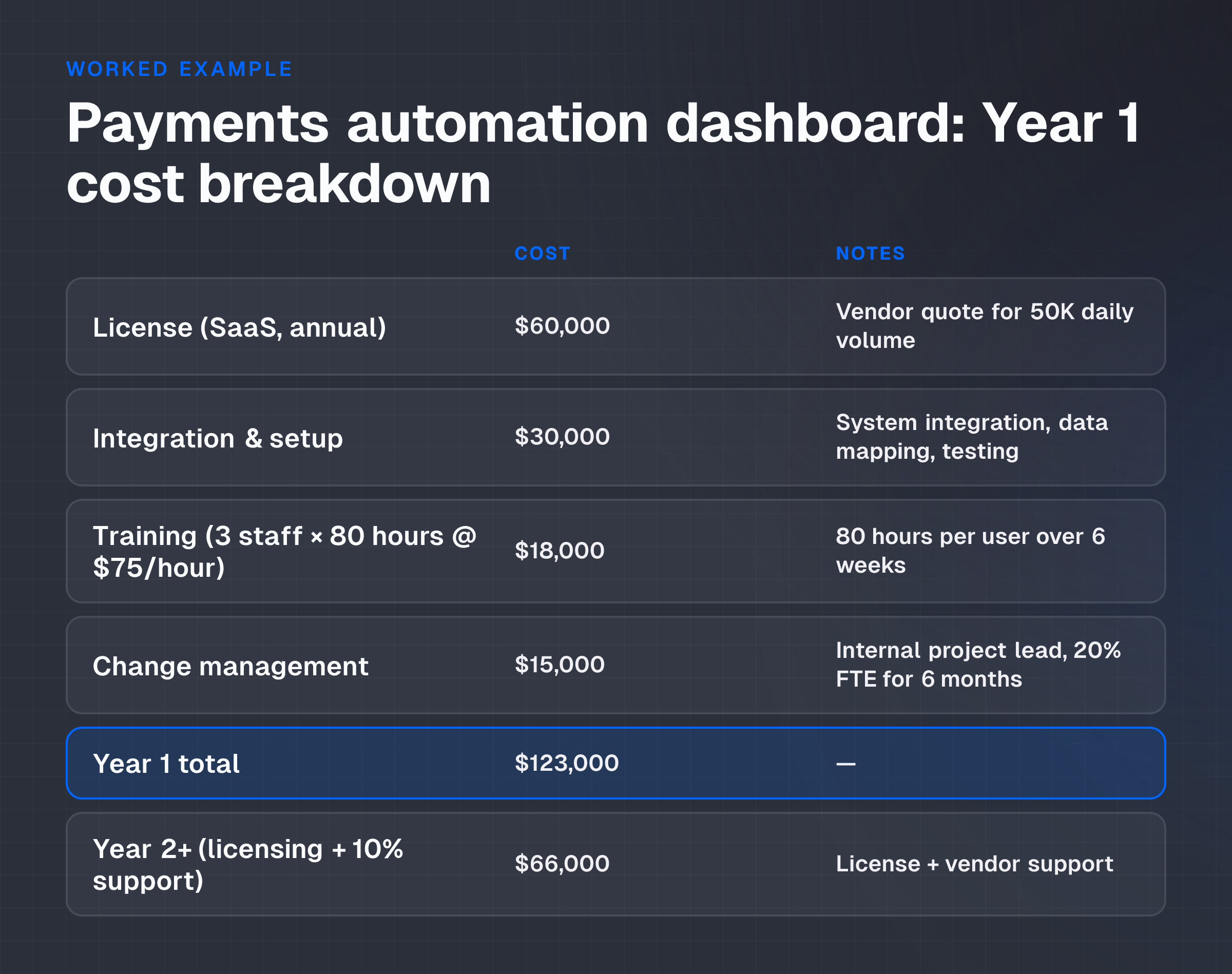
Cost analysis (Year 1, illustrative assumptions):
| Line item | Cost | Notes |
|---|---|---|
| License (SaaS, annual) | $60,000 | Vendor quote for 50K daily volume |
| Integration & setup | $30,000 | System integration, data mapping, testing |
| Training (3 staff × 80 hours @ $75/hour) | $18,000 | 80 hours per user over 6 weeks |
| Change management (internal project lead, 20% FTE for 6 months) | $15,000 | Ongoing coaching, documentation, issue resolution |
| Year 1 total | $123,000 | - |
| Year 2+ (licensing + 10% support) | $66,000 | License + vendor support |
Capacity and outcome analysis (illustrative, assumes successful deployment):
- Current state: 3 staff × 6 hours/day reconciliation = 4,680 annual staff-hours.
- Post-deployment, with dashboard: 3 staff × 1.8 hours/day (review + monitoring) = 1,404 annual staff-hours.
- Capacity released: 3,276 staff-hours annually (70% of original).
- Redeployed capacity: Team reassigned to quality audits, exception investigation, and customer disputes (value-add work previously deferred due to reconciliation volume).
- Cost avoidance: If capacity saves one FTE hire (salary + burden ~$100K), Year 1 net cost = $123K - $100K = $23K. If the tool is used for three years, payback occurs in Year 1.2, and total benefit over three years = $300K (3 FTE-years) - $255K (implementation + support) = $45K net benefit.
This model assumes:
- Integration succeeds on schedule and the dashboard integrates with existing payment rails without manual workarounds.
- The 85% auto-reconciliation rate holds and doesn't degrade as transaction volumes or types shift.
- The team is trained and adopts the dashboard within the projected timeframe.
- Retained review work takes the projected 1.8 hours per day and doesn't expand due to exception complexity.
If any of these assumptions fails (e.g., integration delays push go-live 3 months forward, or review workload expands to 3 hours daily due to edge cases), net ROI declines sharply, and adoption risk rises.
Controls and failure conditions
Fintech workflows demand robust governance.
Before deployment, establish controls at three levels:
Data governance: Confirm that the data feeding the AI tool is clean, timely, and auditable. If transaction data is incomplete or inconsistent, AI models will produce unreliable output. A data audit should precede pilot start.
Decision audit: Define which decisions the AI tool can make autonomously and which require human review. A transaction reconciliation dashboard might auto-settle 85% of matches but escalate exceptions. Document the escalation criteria and ensure human reviewers can understand and override AI decisions when necessary.
Compliance and regulatory fit: Confirm that the tool and its outputs comply with applicable regulations (GDPR, fair lending, AML, etc.). A governance platform should provide audit trails, decision logging, and bias monitoring. If the tool can't produce defensible records of its reasoning, it may violate compliance obligations.
Failure modes to monitor:
- Data quality degradation: If input data quality declines (e.g., upstream system change introduces new null fields or format changes), AI model accuracy typically degrades. Without monitoring, users may not detect the drift and will continue to rely on incorrect output.
- Workflow bypass: Users facing tool friction often revert to manual processes or legacy systems, creating a shadow workflow. If the shadow workflow outpaces the AI tool, adoption collapses. Monitor tool usage rates, error rates, and user feedback continuously.
- Integration failure: If the AI tool's output doesn't integrate cleanly with downstream systems (e.g., API changes, data format incompatibility), users must manually re-enter or correct output. Manual correction converts a time-saving tool into a time-wasting one.
- Support and iteration stall: If vendor support becomes unresponsive or the tool is no longer updated, bugs accumulate and workarounds multiply. Users lose confidence and abandon the tool.
Post-deployment, establish a monthly review cadence to monitor these failure modes. If any deteriorate, address them within one to two weeks or risk accelerated abandonment.
Pilot and decision criteria
A successful pilot doesn't guarantee adoption, but it can surface risks early. Structure the pilot to inform a go/no-go decision before full rollout.
Pilot scope: Run the pilot with a subset of users (one team, one process, 30-60 days) under realistic conditions.
Avoid heroic conditions: pilot users should have normal workload, not the best data or the simplest transactions. Capture what works and what creates friction.
Measurement framework: Define acceptance criteria before pilot start:
- Usage rate: What percentage of applicable transactions/decisions should the tool handle? A 70% adoption rate is realistic; 95% suggests the pilot is too controlled.
- Accuracy/error rate: What false positive and false negative rates are acceptable? A transaction reconciliation tool with a 2% error rate may be acceptable if errors are caught and corrected quickly; a 10% error rate is not.
- Time-to-value: How quickly do pilot users reach baseline competency and start extracting value? If it takes 12 weeks rather than 4, the learning curve is steeper than projected.
- User satisfaction and feedback: Conduct post-pilot surveys and interviews. Did the tool solve the stated problem? What friction did users encounter? Are they willing to use it at scale? Dismissive or negative feedback is a red flag.
- Cost and ROI: Compare actual costs (training, support, integration) against projections. Does the measured time savings or quality improvement match the vendor's claims?
Go/no-go criteria: After the pilot, convene the project team and end-users to assess the evidence:
- Go: Adopt the tool at scale if usage rates meet or exceed 70%, error rates are within acceptable thresholds, time-to-value is achieved within 6 weeks, user feedback is positive or neutral, and actual costs are within ±10% of projections.
- Fix: If specific failure modes are identified (e.g., integration lag, training gaps, data quality issues), address them with a 4-week corrective cycle before broader rollout. A second, targeted pilot may be warranted.
- No-go: If error rates are high, user resistance is strong, integration isn't feasible, or costs significantly exceed projections, discontinue the tool. Sunk pilot cost is irrelevant; the relevant question is whether the tool will create value at scale.
Common pilot pitfall: Treating the pilot as a proof-of-concept rather than a stress-test.
Pilots often succeed because they're smaller, more controlled, and staffed with early adopters. Broader rollout exposes the tool to real-world friction, edge cases, and mixed adoption energy. Assume the tool will perform 20-30% worse at scale than in the pilot.
Conclusion and next step
Fintech teams abandon AI tools after deployment because of training gaps, workflow friction, and misaligned ROI expectations, not because the technology fails.
Adoption sticks when tools are designed to integrate into existing workflows, bundled with realistic expectations, supported by ongoing training and vendor engagement, and refined based on continuous user feedback.
Before committing to an AI tool, stress-test three decisions: (1) Will the workflow be measurable and reviewable? (2) Can the team be trained and supported during the adoption ramp? (3) Are ROI expectations realistic and tied to specific, measurable outcomes?
If you're evaluating an AI tool for fintech operations, start with your workflow and constraints, not the vendor's feature list. Structure a pilot that surfaces real-world friction, measure adoption using realistic criteria, and commit to post-pilot support and iteration.
The decision to scale hinges on evidence from the pilot, not on enthusiasm or vendor claims.
Next action: Map the specific workflow you intend to improve (process steps, current time, staff effort, constraints). Define success in measurable terms (time saved, errors reduced, regulatory compliance). Then evaluate whether the proposed AI tool addresses your workflow or solves someone else's problem.