
The question facing most fintech operators is not whether AI can automate a task, but whether the cost and risk of doing so make it the better choice than hiring. The answer depends on the specific workflow, its volume, error sensitivity, and how quickly it needs to scale. AI copilots typically require higher upfront investment but lower per-unit costs and faster scaling; hiring offers flexibility and human judgment but higher recurring expenses and slower capacity growth. The right decision requires measuring both the total cost of ownership for AI and the total cost of an employee, then comparing payback periods and long-term operational fit.
This article is written for fintech founders and operators who need to decide whether to automate a workflow with AI or scale by adding headcount. It uses a seven-step decision framework based on verified costs, implementation constraints, and governance requirements, not generic productivity claims. Data checked as of 16 October 2026.
Quick answer: Automate or hire?
Automate if the workflow is repetitive, rule-based, high-volume, and prone to human error. The workflow should also be measurable and auditable, since compliance and error correction are core costs.
Hire if the workflow requires nuanced judgment, complex negotiation, or frequent adaptation to exceptions. If scaling speed is the constraint, AI typically moves faster; if flexibility or trust is the constraint, human operators often provide better ROI.
Neither choice is cost-optimal in isolation, the best decision compares the full cost of ownership for both options against your specific workload, risk tolerance, and compliance burden.
The business problem
Fintech operations face a recurring capacity constraint: the volume of transactions, customer inquiries, compliance reviews, or fraud checks keeps growing, and the team cannot keep pace. The operator must choose between two paths: buy software to automate the work, or hire people to do it manually.
The problem is not how to automate, tools exist for most fintech workflows. The problem is that both options carry hidden costs that are rarely counted together. A licensing fee looks cheaper than a salary until you add integration, data preparation, error correction, and ongoing maintenance. A hire looks straightforward until you factor in recruitment, benefits, equipment, attrition, and management overhead.
Most operators make this comparison using only the most visible cost: software subscription versus employee salary. This leads to automating tasks that shouldn't be automated (because error correction exceeds the labor savings) or rejecting automation that would have paid for itself (because integration costs were underestimated and never recovered).
Without a side-by-side accounting of total costs and long-term capacity needs, the choice appears simpler than it is, and the wrong choice looks like the right one until it fails.
Where AI helps and where it does not
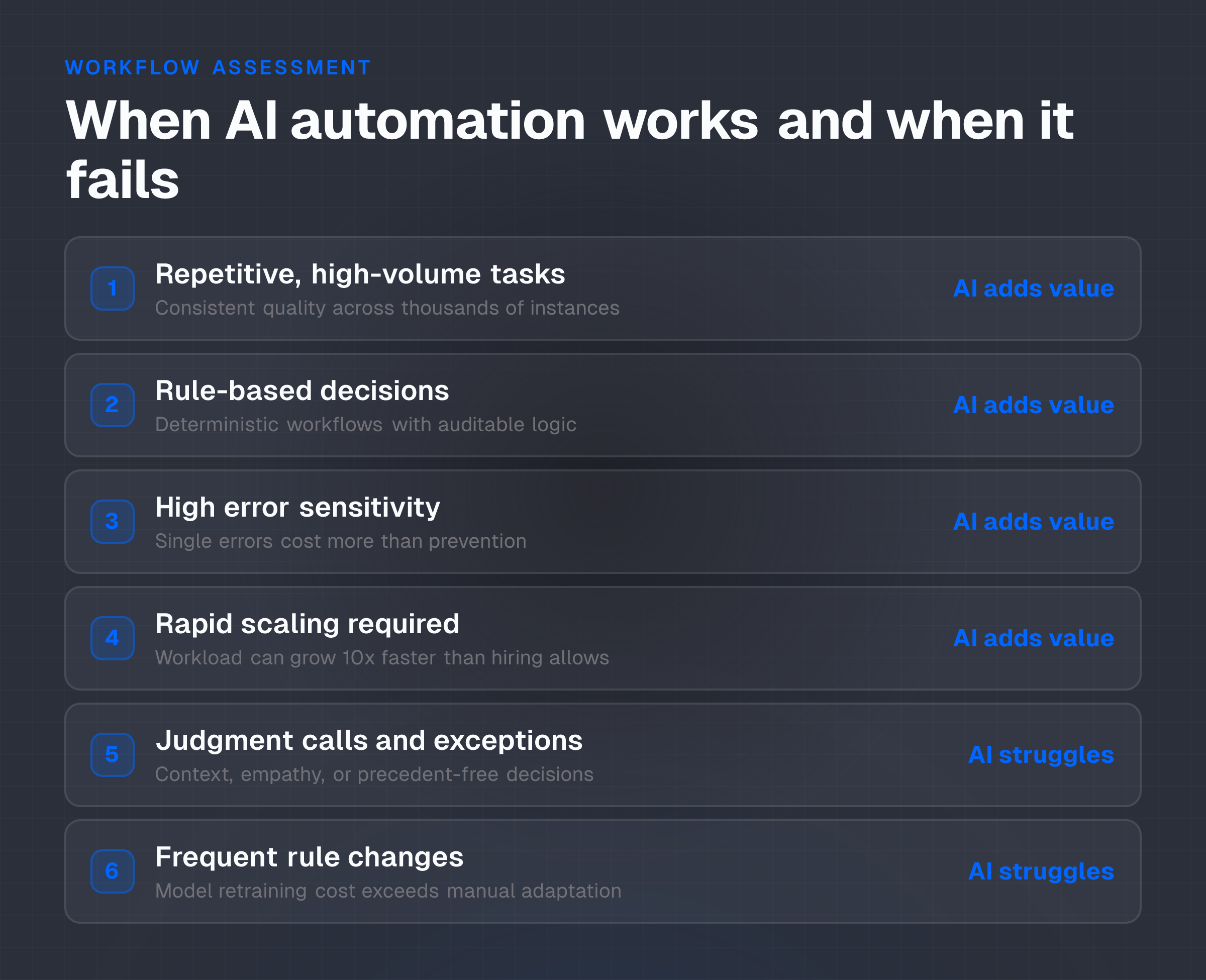
AI copilots work well in specific conditions. They work poorly in others. Knowing which is which prevents wasting investment on automation that adds cost instead of removing it.
Where AI adds value
Repetitive, high-volume tasks: If the workflow is the same every time, transaction screening, invoice categorization, lead triage, compliance flag detection, AI can process thousands or millions of instances at consistent quality. A human operator handling the same task repeatedly will vary in speed and accuracy and will grow fatigued.
AI does not.
Rule-based decisions: If the decision is deterministic (if X, then Y) and auditable, AI can execute it reliably. Fraud scoring, customer risk assessment, or regulatory report generation are examples. The rules may be complex, but they don't require judgment calls.
High error sensitivity: If a single error in a workflow costs significantly more to fix than the labor to prevent it, AI's consistency can justify its cost. A missed fraud detection or a miscoded transaction can trigger regulatory fines, customer disputes, or operational delays that dwarf the cost of an AI system or a human reviewer. Conversely, if errors are cheap to catch and fix downstream, human operators may suffice.
Scaling beyond headcount limits: If the workload can grow 10x tomorrow but hiring cannot scale that fast, AI provides a release valve. An AI system can handle 1,000x the load of a single operator with minimal incremental cost.
Hiring ten times is not possible in weeks.
Where AI struggles or fails
Judgment calls and exception handling: If the workflow requires reasoning about context, empathy, or trade-offs, a customer complaint, a complex negotiation, a decision that has no precedent in training data, AI often struggles. Humans navigate these by intuition and experience. AI can assist (by summarizing the case), but the call usually stays with a human.
Adaptability to rule changes: If the workflow's rules change frequently, new compliance requirements, changed payout policies, or updated fraud patterns, AI models require retraining. A human operator learns the new rule once and applies it immediately. The cost and delay of model retraining can cancel out automation gains if the business changes fast.
Low-precision environments: If the cost of a false positive is high (e.g., blocking a legitimate transaction to prevent fraud), AI must be tuned carefully, and that tuning requires ongoing human review. If the AI's error rate remains unacceptably high even after tuning, the value of automation disappears, and the cost of error correction rises above the cost of hiring.
Trust and auditability gaps: In regulated financial services, an AI decision must be explainable and defensible. If the AI operates as a "black box", its reasoning opaque or impossible to trace, regulators, auditors, and compliance teams will reject it, regardless of accuracy.
The cost of building an auditable system often exceeds the cost of a human operator for smaller workflows.
Integration barriers: If the workflow lives across legacy systems with poor API coverage or requires manual data entry between systems, integrating an AI copilot may cost more than the labor it saves. This is common in older fintech stacks.
Implementation model
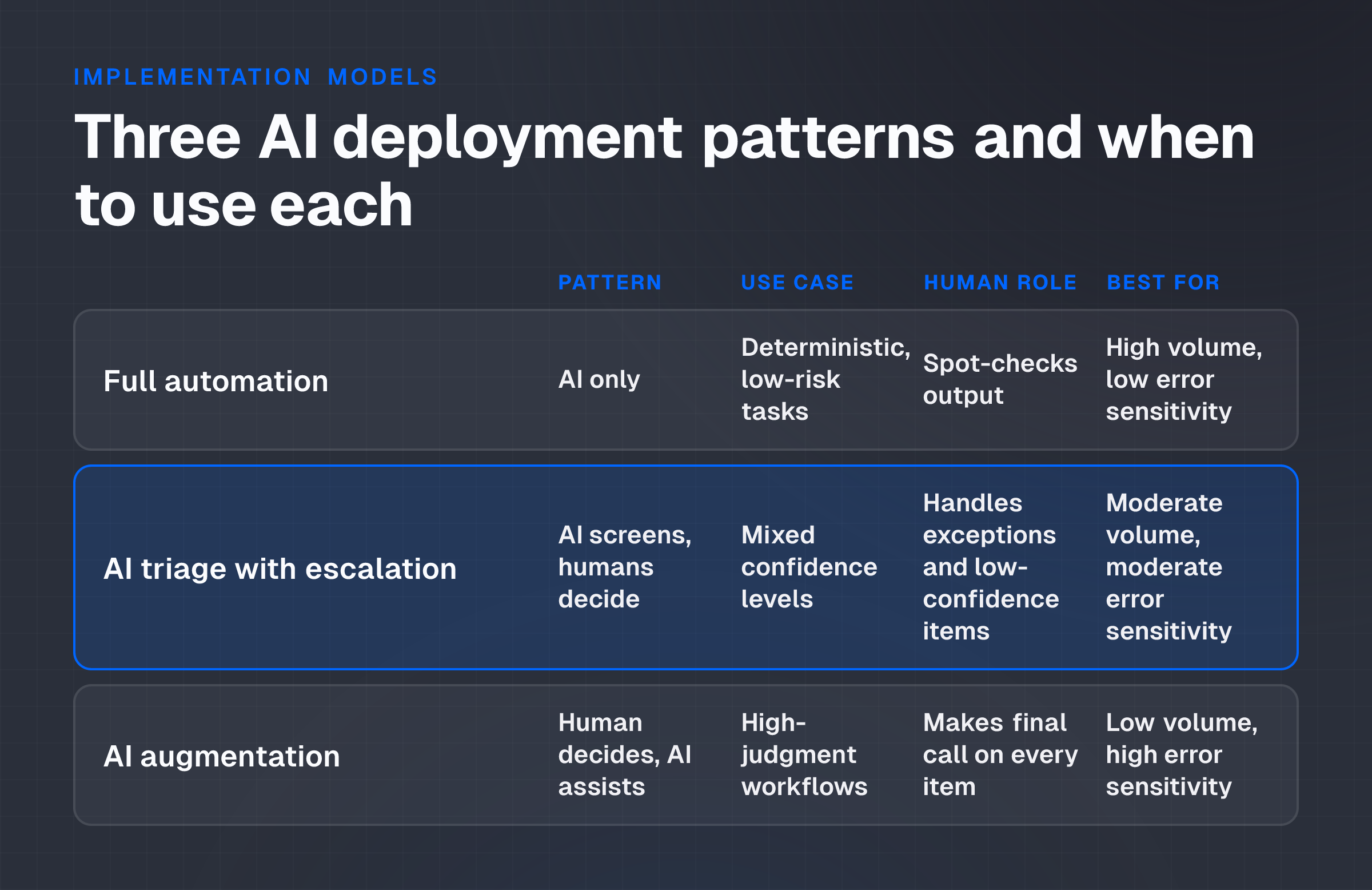
The choice is not all-or-nothing automation or all-hiring. The most durable implementation model is a hybrid: AI handles high-volume, low-judgment tasks; humans handle exceptions, judgment calls, and oversight.
Three deployment patterns
Full automation (AI only): The workflow runs entirely through the AI system with minimal human intervention. This works for deterministic, low-risk tasks: categorizing transactions, routing customer emails to the correct department, generating compliance reports. A human spot-checks output but doesn't review every item. This pattern minimizes ongoing labor cost but requires robust error detection and governance.
AI triage with human escalation: The AI copilot screens all incoming work and routes items to the appropriate handler. High-confidence items go directly to execution or completion; low-confidence or complex items escalate to a human operator.
This protects quality while preserving efficiency gains. Fraud detection systems often use this model: AI flags suspicious transactions for a human reviewer to approve or reject. A prop trading platform serving 400,000 traders monthly might use AI to answer 80% of routine support queries and escalate the remaining 20% to an agent. This lets operators focus on high-value interactions.
AI augmentation (AI assists human): The human operator remains the primary decision-maker, but the AI provides summaries, suggestions, or automated prep work. A compliance officer reviewing transactions uses an AI system that flags risky patterns and suggests remediation steps, but the officer makes the final call. This model preserves human control and judgment while reducing the time and cognitive load per task. It works well when error sensitivity is high or when the workflow is evolving.
The choice of pattern depends on error sensitivity, volume, and tolerance for exceptions. High-volume, low-error-sensitivity workflows move toward full automation. High-error-sensitivity or high-judgment workflows move toward augmentation.
Controls, governance and human review
An AI system without controls is a liability, not an asset. The cost of fixing AI errors, or hiding them, often exceeds the cost of the system itself.
Governance and human review are not optional overhead; they're core components of the implementation model.
Governance framework
Audit trail and explainability: Every AI decision must be logged with the inputs, the reasoning, and the output. If the AI can't explain why it scored a transaction as risky or why it routed a customer to a specific department, the system is not ready for production. This requirement often increases implementation cost but is non-negotiable in regulated fintech.
Sampling and exception monitoring: Even in full automation, sample 5-10% of AI decisions each week and have a human reviewer check them. If error rate exceeds a threshold (typically 2-5%, depending on the task), pause the workflow and investigate.
Set hard thresholds, not guidelines. When the error rate crosses the line, the system stops processing until the issue is fixed.
Model retraining triggers: Define what triggers model retraining: new rule changes, performance degradation, or shifts in data distribution. Without explicit triggers, retraining is delayed or skipped, and model drift causes performance to degrade silently.
Human approval for high-stakes decisions: If the AI is making a decision that affects a customer's access to funds, their account status, or a regulatory determination, require human approval before execution. The AI can prepare the decision and recommend it, but a person signs off. This is slower than pure automation but prevents costly errors from going undetected.
Escalation paths: Define how and when a customer, an operator, or a compliance team member can override an AI decision or escalate a workflow. If the system has no escape hatch, a single bug or edge case can cascade into a large operational failure.
Cost of governance
Governance is work, and work is cost. Budget for:
- A compliance or audit person to spot-check output (5-10 hours per week for a moderate-volume workflow).
- A data engineer or ML specialist to monitor model performance and retrain as needed (10-20 hours per month after deployment).
- Documentation and runbooks for what to do when the AI fails (5-10 hours per incident).
- Legal or regulatory review before deployment and after major changes (20-40 hours upfront, then 5-10 hours per quarter).
For a small fintech with limited staffing, this governance cost can be 30-50% of the labor the AI was supposed to save. For a large fintech with dedicated compliance and data teams, governance cost is 10-15% of labor savings.
This isn't a reason to skip governance; it's a reason to factor it into the total cost calculation from the start.
Cost and measurement framework
Both AI and hiring involve multiple cost streams. Comparing them requires adding up all the costs, not just the most obvious ones.
Total cost of ownership for AI
Software and licensing:
- Vendor subscription fees (per month, per user, or per transaction).
- Premium features, API overages, or usage tiers.
Implementation and integration:
- One-time cost to connect the AI tool to your payment platform, CRM, compliance system, and data warehouse.
- Data cleaning and labeling (preparing training data).
- Customization and fine-tuning to your specific use case.
- Testing and staging before production.
This phase often costs $20,000 to $100,000+ depending on system complexity and integration depth. Underestimating integration is a leading cause of AI projects running over budget.
Infrastructure:
- Cloud compute (if the AI runs on your cloud account, not the vendor's).
- Data storage and retrieval.
- Backups and disaster recovery.
Maintenance and support:
- Vendor support contracts.
- Internal IT support for monitoring and troubleshooting.
- Model retraining and version updates.
- Bug fixes and security patches.
Error management:
- Labor to monitor AI output, catch errors, and correct them.
- Cost of errors that slip through (rework, customer compensation, regulatory fines).
Over a three-year horizon, total cost of ownership for a moderate-complexity fintech AI deployment typically ranges from $100,000 to $500,000. For a high-complexity workflow (e.g., fraud detection at scale), it can exceed $1 million. This is a rough range; verify with actual vendor quotes and integration estimates for your specific setup.
Total cost of employee
Compensation:
- Annual salary.
- Bonuses or performance incentives.
- Health, dental, vision insurance.
- Retirement plan contributions (e.g., 3-5% of salary).
- Payroll taxes (employer portion, typically 10-15% of salary).
Recruitment and onboarding:
- Recruiter fees or advertising (often 10-20% of first-year salary for external hires).
- Hiring manager time (typically 20-40 hours of interviews, reference checks, offer negotiation).
- Training and ramp-up time (typically 4-12 weeks before the operator is fully productive).
Ongoing costs:
- Office or workspace (desk, chair, laptop).
- Licenses and tools (trading platform access, compliance software).
- Management and supervision time.
- Attrition and replacement (average tenure varies by role; budget for 20-30% annual turnover).
For a fintech operator in a mid-cost geographic region earning $50,000-$80,000 in base salary, total cost of employment typically ranges from $70,000 to $120,000 per year. Over three years, that's $210,000 to $360,000.
Over a three-year horizon, the comparison looks like this:
| Metric | AI System | Hire 1 FTE |
|---|---|---|
| Year 1 cost | $80,000 (impl) + $30,000 (ongoing) | $110,000 |
| Year 2 cost | $30,000 (ongoing) | $110,000 |
| Year 3 cost | $30,000 (ongoing) | $110,000 |
| Total 3-year cost | $140,000 | $330,000 |
| Cost per unit of work (if AI handles 100x volume) | $1.40 per 1,000 items | $3.30 per 1,000 items |
This is illustrative. Your actual numbers will differ. The key insight: AI is often more expensive in year one, cheaper in years two and three, and dramatically cheaper per unit as volume grows.
Payback period and breakeven
Payback is the point at which cumulative savings from the AI system exceed its cumulative cost. To calculate it:
- Estimate the total labor cost of the current manual process (FTEs × annual cost per FTE).
- Estimate the total cost of implementing and running the AI system for year one.
- Calculate the labor hours saved by the AI system (volume processed by AI × hours per item).
- Multiply hours saved by the fully-loaded hourly cost (annual salary + benefits / 2,000 working hours).
- Subtract the AI system cost from the labor savings. If positive, the system pays for itself in year one. If negative, calculate how many months into year two it takes to reach breakeven.
Example:
- Current process: 2 FTEs at $100,000/year = $200,000 annual cost.
- AI system cost: $80,000 implementation + $30,000 year one = $110,000.
- Expected outcome: AI handles 80% of volume; 1 FTE remains for oversight and exceptions.
- Year one labor cost after AI: 1 FTE × $100,000 = $100,000.
- Year one savings: $200,000 (current) − $100,000 (after AI) = $100,000.
- Year one net: $100,000 (savings) − $110,000 (AI cost) = −$10,000.
- Breakeven: Month 1 of year two. At that point, the system has saved $100,000 in year two while costing $30,000, for a net of $70,000 in year two.
For workflows where the AI is doing augmentation (assisting humans rather than replacing them), the payback often extends to 18-24 months, and the premise shifts: you're not replacing labor, you're making existing labor more productive. In that case, measure ROI as (productivity gain × hourly rate / AI cost), and acceptable ROI is typically 2x or higher in year one.
Common failure modes
Even well-designed AI implementations fail. Knowing what goes wrong prevents spending money to fix problems that should have been caught upfront.
Data quality and training data problems
AI performs only as well as its training data. If training data is biased, incomplete, or unrepresentative of real-world cases, the AI will make poor decisions at scale.
Example: An AI fraud detection system trained on transaction data from the past two years works well until a new type of fraud emerges that was rare in training data. The system misses it. Meanwhile, the human reviewers have also been laid off, so no one catches it until losses mount.
Prevention: Use data that spans multiple market conditions, fraud patterns, and edge cases. Validate training data quality before building the model. Budget for data cleaning and labeling; don't assume the data you have is clean enough to use directly.
Integration delays and hidden costs
Integrating an AI tool into legacy fintech infrastructure is often slower and more expensive than quoted. APIs may not exist, data formats may not match, or the vendor's documentation may be incomplete.
Example: A compliance team expects to deploy an AI system in 3 months. The vendor quotes $20,000 for integration. In reality, the API doesn't support the necessary query patterns, custom development adds 2 months, and the total integration cost reaches $80,000. By the time the system is live, the cost-benefit ratio has deteriorated significantly, and the project is at risk of cancellation.
Prevention: Budget 1.5x to 2x the vendor's integration estimate. Get written API specifications and data mapping requirements before signing a contract. Assign an internal engineer to validate the vendor's timeline independently.
Model drift and silent performance degradation
After deployment, the real world changes. Fraud patterns evolve, customer behavior shifts, or system rules change. The AI model was trained on historical data and doesn't adapt automatically.
Its performance degrades slowly, and no one notices until errors spike.
Example: A chatbot trained to answer routine customer support questions performs well for 6 months. Then, a new product feature launches, and customer questions shift. The chatbot's accuracy drops from 85% to 60%, but there's no automated alert. Customers complain for weeks before anyone realizes the system is broken.
Prevention: Set up automated performance monitoring. Track key metrics (accuracy, error rate, decision distribution) weekly. If a metric crosses a threshold, alert the team and pause the system if necessary. Schedule quarterly retraining, not annual.
Governance theater without teeth
Teams set up impressive governance frameworks (sample reviews, audit trails, escalation processes) but don't enforce them. When the AI makes an error, there's no consequence, so governance is gradually abandoned.
Example: A trading platform deploys AI to screen trades for compliance. The policy says human review of 10% of trades weekly. After 2 months, the compliance team is behind on other work, and reviews drop to 2% and then 0%. Six months later, a regulatory audit finds three trades that should have been blocked.
The firm pays a fine.
Prevention: Governance is not a checklist; it's a process that must be enforced every week. Assign one person (not a committee) ownership of each governance task. Track adherence metrics. If sampling falls below 5%, stop the AI and ask why before restarting.
Over-automating complex judgment calls
Teams automate workflows that should remain human-driven because they require judgment, negotiation, or contextual reasoning. The AI makes decisions that sound logical in isolation but fail in context.
Example: An AI system is deployed to automatically approve or deny customer payout requests based on account history and compliance rules. It denies a valid request from a long-time customer because the rule set doesn't account for a recent policy exception the compliance team made verbally. The customer loses trust and leaves.
Prevention: Audit the workflow before automating. If it requires more than rule application, if it involves judgment, exceptions, or reasoning about context, design the system for augmentation (AI assists the human) rather than automation (AI decides). The cost of full automation is usually not justified for these workflows.
Underestimating the cost of error correction
When the AI makes an error, someone has to fix it. This cost is often not budgeted. If the error rate is high, error correction can cost more than the labor the AI was supposed to save.
Example: An AI system processes 10,000 transactions per day and catches 5% as potentially risky. A human reviewer must then check all 500 flagged items per day. This was supposed to save labor, but instead, the cost is equivalent to hiring someone full-time just to handle false positives.
Prevention: Pilot the system on a subset of work and measure the true error rate and error correction cost. If error correction exceeds 20% of the labor savings, rethink the automation strategy. Consider adjusting the AI's confidence threshold to reduce false positives, even if it means missing a few true positives.
Implementation checklist
Before deploying an AI system, work through this checklist. If you can't check every box, either solve the problem first or reconsider whether now is the right time to deploy.
Pre-implementation
- Define the workflow and measure its current cost (labor, errors, lost time).
- Identify the specific metrics the AI must improve (speed, accuracy, cost, compliance).
- Validate that the workflow is rule-based or classifiable, not judgment-driven.
- Estimate both the total cost of ownership for AI and the total cost of equivalent headcount.
- Calculate the payback period and confirm it aligns with the business's cash and risk tolerance.
- Audit training data for quality, bias, and representativeness. Clean it if necessary.
- Get written integration specifications and a realistic timeline from the vendor (add 50% contingency).
- Define the governance model: who reviews output, how often, and what triggers an alert or pause.
- Get legal and compliance approval before proceeding.
Pilot and testing
- Run a limited pilot on real data (1-2 weeks of volume, not a toy dataset).
- Measure accuracy, false positive rate, false negative rate, and processing speed.
- Have a human auditor review a random sample of AI decisions and verify they make sense.
- Identify edge cases that the AI struggles with; decide whether to reclassify them as exceptions or retrain the model.
- Calculate the true cost of error correction based on pilot results.
- Compare pilot performance to the original business case. If significant gaps, either fix the system or abandon the project.
Production deployment
- Deploy to production only after governance, escalation paths, and monitoring are live.
- Start with a subset of volume (e.g., 10-20% of daily items) and monitor for 2 weeks.
- Increase volume gradually as confidence and performance remain stable.
- Confirm that governance processes (sampling, alert thresholds, escalation) are being followed.
- Measure actual cost savings and compare to projections. Update assumptions if reality diverges.
Post-deployment
- Schedule quarterly performance reviews. Track accuracy, error rate, and cost of error correction.
- Retrain the model if accuracy drops or rule changes occur.
- Maintain a log of errors, their root causes, and remediation steps.
- Conduct an annual cost-benefit review. Is the AI still cost-effective compared to hiring?
Next step
The decision to automate or hire is not binary; it's a staged investment decision. Before committing to a full AI deployment or a big hiring round, run a focused pilot on the specific workflow you're considering.
Start with the financial comparison: measure your current manual process cost, get a realistic quote from a vendor (including integration), and calculate the payback period. If payback is less than 18 months and error correction costs are below 20% of labor savings, the financial case is strong. If payback extends beyond 2 years or error correction is high, explore hiring or a partial automation approach instead.
If the financial case is solid, design a two-week pilot. Run the AI on real data, measure error rate, and have a human auditor spot-check output. The pilot will reveal integration problems, data quality issues, or edge cases that no amount of planning can predict. Use pilot data to refine your cost estimate and governance model before going live.
The implementation model you choose, full automation, triage with escalation, or augmentation, should reflect your error sensitivity, compliance burden, and team capacity. High-judgment workflows almost always work better as augmentation than as full automation. High-volume, low-judgment workflows move toward automation. Most fintech workflows fall somewhere in between and require a hybrid approach.
Document your governance model before deployment. Assign one person ownership of each governance task: sampling, monitoring, retraining, and escalation.
Without clear ownership and regular enforcement, governance becomes theater, and the AI system becomes a liability.
Finally, measure and course-correct. After three months of production deployment, compare actual cost savings and error rates to your projections. If the numbers match, scale or automate the next workflow. If they diverge, pause and investigate. The tools and patterns you learn from this first automation will make the next one faster and more predictable.